FORGE MULTIMEDIA GROUP LLC / VOICE CHARACTER

BarkerBox

Send a voice somewhere vivid: through a handheld horn, a crackly ceiling speaker, a carnival midway, or the last inning of a movie ballgame.

Early access beta · Review compatibility before buying.

SIX WAYS
TO SPEAK.

From a ceiling PA to a carnival midway, each circuit sets a scene. Use the plug-in or standalone app to shape the voice for yours.

01

MEGAPHONE

Handheld horn bite and up-front projection.
02

OVERHEAD PA

The color of an announcement through a ceiling speaker.

03

SIDESHOW

Midway barker energy with grit and space.

04

HORN-ON-MIC

A physical horn pressed into the microphone world.

05

DISPATCH RADIO

Compressed, narrow-band radio urgency.

06

STADIUM PA

Cheesy, larger-than-life movie-ballpark announcements.

Compare original and BarkerBox audio on the live demo page

DIAL IN
THE SCENE.

The native interface gives you eight real-time controls: Input, Output Trim, Presence, Horn Focus, Grit, Space, Distortion, and Reverb. The six voice buttons get you close; the faders make it yours.
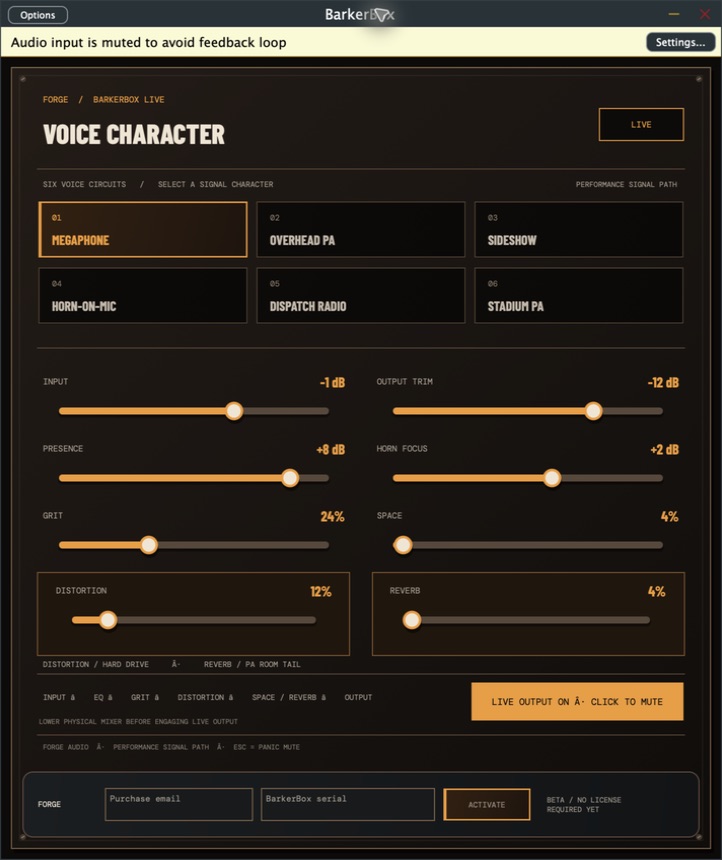
This is the current BarkerBox interface. Controls may change during early access.

BarkerBox development interface with six voice buttons and eight orange sound faders
ACTUAL BARKERBOX INTERFACE

ONE VOICE TOOL.
THREE SYSTEMS.

One $19 early-access purchase includes native packages for Mac, Windows, and Linux, with a standalone app for live input and plug-in formats for audio hosts.

MAC / APPLE SILICON

AU · VST3 · APP

macOS 13+. Ad-hoc signed; not notarized or validated in every host.

WINDOWS / X64

VST3 · APP

Built with automated engine tests passed; real-world host and interface testing is pending.

LINUX / X64

VST3 · LV2 · APP

Built with automated engine tests passed; distribution and host testing is pending.

This is beta software. Test your audio hardware and routing before a live show, and review the current limitations and refund guidance on the BarkerBox site before buying.