
FORGE / DEVELOPMENT PREVIEW
GROOVE
CONSOLE.
Development preview: Groove Console explores vinyl-inspired tone, surface noise, and performance gestures. The interface shown here is current project work; final controls and availability may change.
Explore the interface Development interface preview · Not a browser audio processor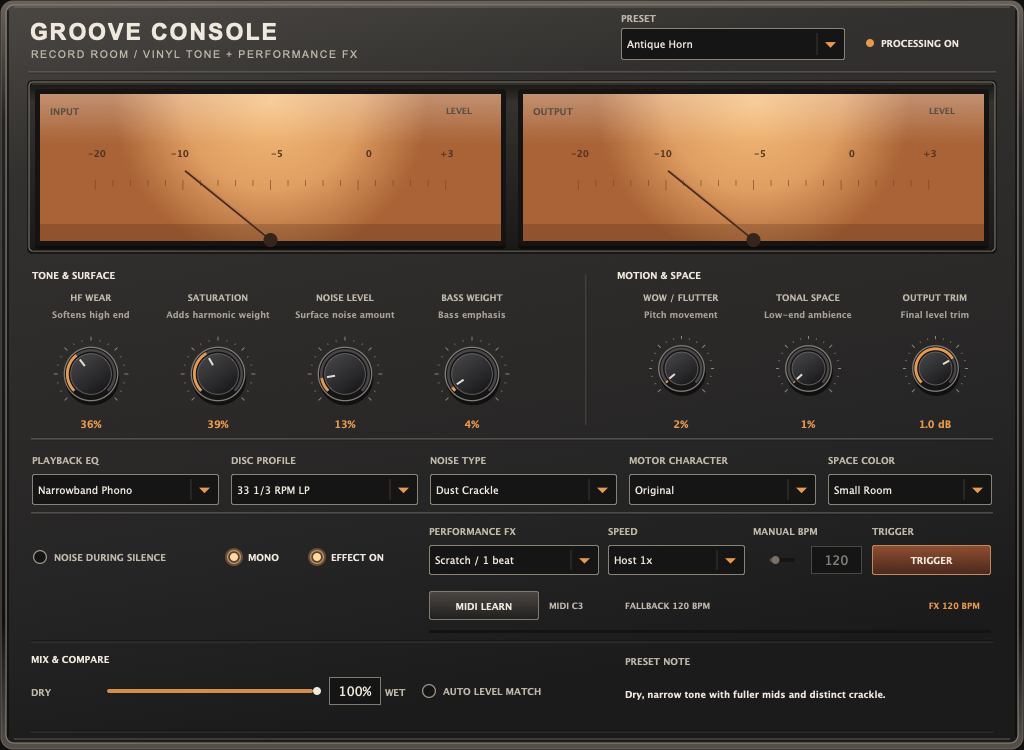
INSIDE THE
CONSOLE.
Choose a section to explore the current development interface. This is a visual tour, not an interactive browser plug-in.
Dial in the record-playback body and surface texture. Noise Level and Noise Type are separate controls, so crackle can be subtle or deliberate.
COLOR THE
PLAYBACK.
Put Groove Console on a drum break, loop, keys, vocal, or transition. Choose from nine factory starting points, then adjust the playback character until it sits in the track.
MAKE A
MOVE.
Trigger six history-based scratch, rewind, and stop gestures. Timing can follow the host at half, normal, double, or quadruple speed—or use a manual BPM. The project tempo itself does not change.